ESP32#
The ESP32 is microcontroller developed by Espressif packed with many features including built-in wireless communication (wifi/bluetooth). Several variants of the chip have been made to support a variety of usecases for low-cost and low-power applications.
AWS M5Stack ESP32 IoT Core Development Kit#
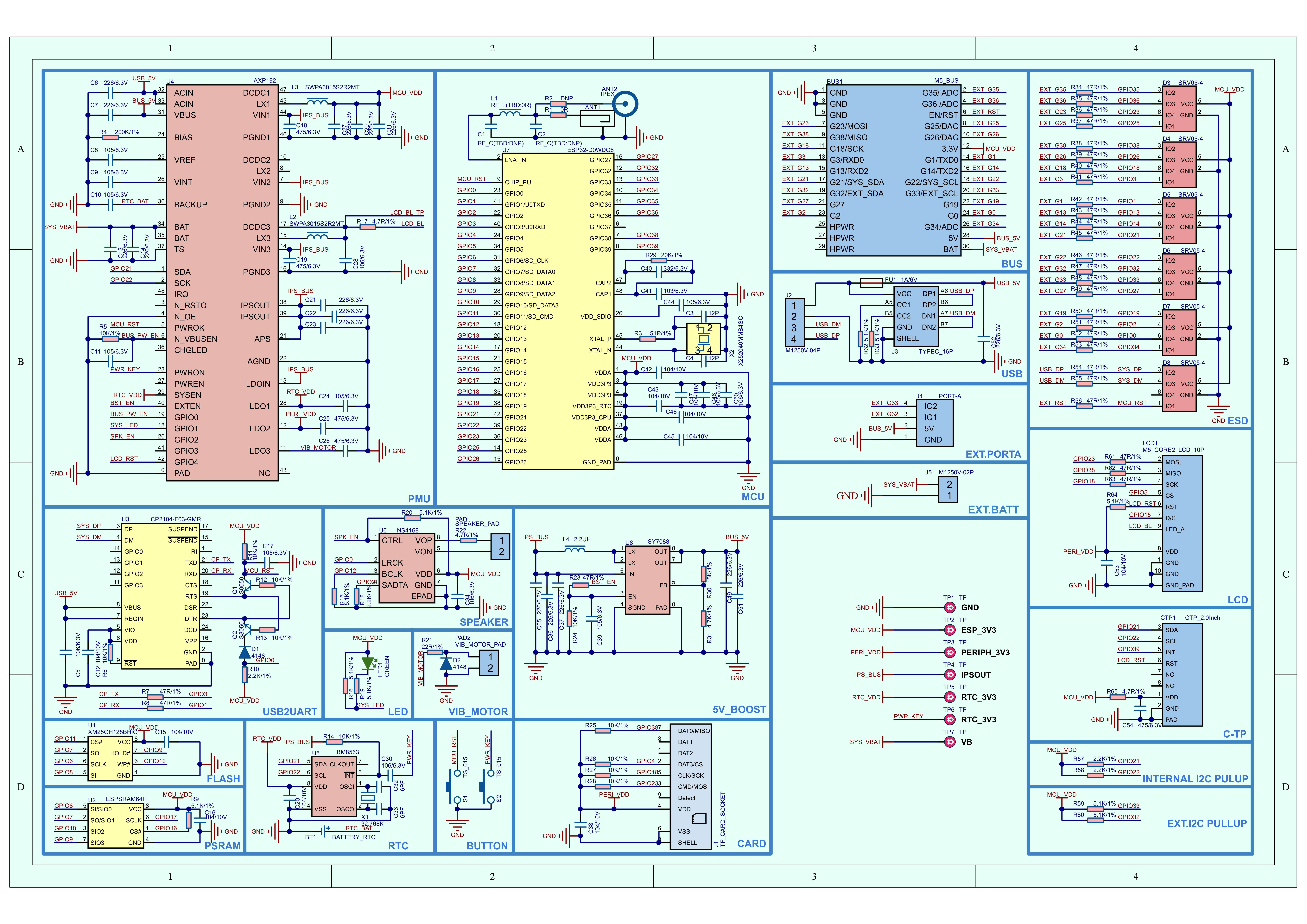
The AWS M5Stack ESP32 is the device used as an example here for developing on a microcontroller.
M5Stack Datasheet#
Building and Flashing the ESP32 with IDF#
Espressif uses their ESP-IDF tool to configure, build, and flash code onto their devices. For ease of use and convenience, the IDF provides a python script, idf.py, to wrap around the main tools of CMake, Ninja, and esptool.py to build, deploy, and debug a project for the ESP32. The docker image provides a preinstalled version of the IDF tool suite to quickly begin developing a project.
Compiling a Hello World#
To quick get started with the ESP tools, a Docker image is pulled using the command below. Containerizing the development tools enables ease of portability from having to maintain a suite of tools installed natively on the machine.
# run container
docker run --rm -it -u root:root --dev /dev/ttyUSB0 --privileged espressif/idf:v5.5

# podman requires the --group-add keep-group argument to support bypassing host to container mapping of group permissions for the container to properly access the device
# https://www.redhat.com/en/blog/files-devices-podman
podman run --rm -it --dev /dev/ttyUSB0 --group-add keep-group --privileged espressif/idf:v5.5
Mount a volume for persistent data to include the hello_world example which has the following directory structure for the project root.
hello_world project tree#.
├── CMakeLists.txt
└── main
├── CMakeLists.txt
└── hello_world_main.c
The commands below are used to
Set the target ESP32 device
Modify any additional configurations (optional)
Build the project
Flash the project to the device
Using the example compose.yml file in Module-02, run the idf container and flash the hello world C++ program to the device.
docker compose run --rm idf

cd hello_world/

# set esp32 as the target device and autogenerate the sdkconfig
idf.py set-target esp32

# build the project
idf.py build

# flash the built project to the device
idf.py flash -p /dev/ttyUSB0

# read the output of the serial device
# use Ctrl + ] to exit monitor view
idf.py monitor -p /dev/ttyUSB0
idf.py flash -p /dev/ttyUSB0#Executing action: flash
Running ninja in directory /project/hello_world/build
Executing "ninja flash"...
[1/5] cd /project/hello_world/build/esp-idf/esptool_py && /opt/esp/python_env/idf5....uild/partition_table/partition-table.bin /project/hello_world/build/hello_world.bin
hello_world.bin binary size 0x25fc0 bytes. Smallest app partition is 0x100000 bytes. 0xda040 bytes (85%) free.
[1/1] cd /project/hello_world/build/bootloader/esp-idf/esptool_py && /opt/esp/pytho...ffset 0x8000 bootloader 0x1000 /project/hello_world/build/bootloader/bootloader.bin
Bootloader binary size 0x6680 bytes. 0x980 bytes (8%) free.
[4/5] cd /opt/esp/idf/components/esptool_py && /opt/esp/tools/cmake/3.30.2/bin/cmak...oject/hello_world/build -P /opt/esp/idf/components/esptool_py/run_serial_tool.cmake
esptool.py --chip esp32 -p /dev/ttyUSB0 -b 460800 --before=default_reset --after=hard_reset write_flash --flash_mode dio --flash_freq 40m --flash_size 2MB 0x1000 bootloader/bootloader.bin 0x10000 hello_world.bin 0x8000 partition_table/partition-table.bin
esptool.py v4.9.0
Serial port /dev/ttyUSB0
Connecting....
Chip is ESP32-D0WDQ6-V3 (revision v3.0)
Features: WiFi, BT, Dual Core, 240MHz, VRef calibration in efuse, Coding Scheme None
Crystal is 40MHz
MAC: b4:8a:0a:bf:5f:28
Uploading stub...
Running stub...
Stub running...
Changing baud rate to 460800
Changed.
Configuring flash size...
Flash will be erased from 0x00001000 to 0x00007fff...
Flash will be erased from 0x00010000 to 0x00035fff...
Flash will be erased from 0x00008000 to 0x00008fff...
SHA digest in image updated
Compressed 26240 bytes to 16487...
Writing at 0x000075fb... (100 %)
Wrote 26240 bytes (16487 compressed) at 0x00001000 in 0.8 seconds (effective 259.3 kbit/s)...
Hash of data verified.
Compressed 155584 bytes to 85104...
Writing at 0x000349ab... (100 %)
Wrote 155584 bytes (85104 compressed) at 0x00010000 in 2.3 seconds (effective 547.1 kbit/s)...
Hash of data verified.
Compressed 3072 bytes to 103...
Writing at 0x00008000... (100 %)
Wrote 3072 bytes (103 compressed) at 0x00008000 in 0.1 seconds (effective 413.3 kbit/s)...
Hash of data verified.
Leaving...
Hard resetting via RTS pin...
Done
idf.py monitor -p /dev/ttyUSB0#Executing action: monitor
Running idf_monitor in directory /project/hello_world
Executing "/opt/esp/python_env/idf5.5_py3.12_env/bin/python /opt/esp/idf/tools/idf_monitor.py -p /dev/ttyUSB0 -b 115200 --toolchain-prefix xtensa-esp32-elf- --target esp32 --revision 0 /project/hello_world/build/hello_world.elf /project/hello_world/build/bootloader/bootloader.elf -m '/opt/esp/python_env/idf5.5_py3.12_env/bin/python' '/opt/esp/idf/tools/idf.py'"...
--- esp-idf-monitor 1.7.0 on /dev/ttyUSB0 115200
--- Quit: Ctrl+] | Menu: Ctrl+T | Help: Ctrl+T followed by Ctrl+H
I (13) boot: ESP-IDF v5.5 2nd stage bootloader
I (13) boot: compile time Nov 29 2025 21:45:01
I (13) boot: Multicore bootloader
I (14) boot: chip revision: v3.0
I (16) boot.esp32: SPI Speed : 40MHz
I (20) boot.esp32: SPI Mode : DIO
I (24) boot.esp32: SPI Flash Size : 2MB
I (27) boot: Enabling RNG early entropy source...
I (32) boot: Partition Table:
I (34) boot: ## Label Usage Type ST Offset Length
I (41) boot: 0 nvs WiFi data 01 02 00009000 00006000
I (47) boot: 1 phy_init RF data 01 01 0000f000 00001000
I (54) boot: 2 factory factory app 00 00 00010000 00100000
I (60) boot: End of partition table
I (63) esp_image: segment 0: paddr=00010020 vaddr=3f400020 size=07600h ( 30208) map
I (81) esp_image: segment 1: paddr=00017628 vaddr=3ff80000 size=00020h ( 32) load
I (82) esp_image: segment 2: paddr=00017650 vaddr=3ffb0000 size=021e8h ( 8680) load
I (89) esp_image: segment 3: paddr=00019840 vaddr=40080000 size=067d8h ( 26584) load
I (103) esp_image: segment 4: paddr=00020020 vaddr=400d0020 size=0fbach ( 64428) map
I (126) esp_image: segment 5: paddr=0002fbd4 vaddr=400867d8 size=063c0h ( 25536) load
I (142) boot: Loaded app from partition at offset 0x10000
I (142) boot: Disabling RNG early entropy source...
I (153) cpu_start: Multicore app
I (161) cpu_start: Pro cpu start user code
I (161) cpu_start: cpu freq: 160000000 Hz
I (161) app_init: Application information:
I (161) app_init: Project name: hello_world
I (165) app_init: App version: 1
I (169) app_init: Compile time: Nov 29 2025 21:46:01
I (174) app_init: ELF file SHA256: c80db80b6...
I (178) app_init: ESP-IDF: v5.5
I (182) efuse_init: Min chip rev: v0.0
I (186) efuse_init: Max chip rev: v3.99
I (190) efuse_init: Chip rev: v3.0
I (194) heap_init: Initializing. RAM available for dynamic allocation:
I (200) heap_init: At 3FFAE6E0 len 00001920 (6 KiB): DRAM
I (205) heap_init: At 3FFB2A50 len 0002D5B0 (181 KiB): DRAM
I (210) heap_init: At 3FFE0440 len 00003AE0 (14 KiB): D/IRAM
I (216) heap_init: At 3FFE4350 len 0001BCB0 (111 KiB): D/IRAM
I (221) heap_init: At 4008CB98 len 00013468 (77 KiB): IRAM
I (227) spi_flash: detected chip: generic
I (230) spi_flash: flash io: dio
W (233) spi_flash: Detected size(16384k) larger than the size in the binary image header(2048k). Using the size in the binary image header.
I (246) main_task: Started on CPU0
I (256) main_task: Calling app_main()
Hello world!
This is esp32 chip with 2 CPU core(s), WiFi/BTBLE, silicon revision v3.0, 2MB external flash
Minimum free heap size: 306072 bytes
Restarting in 10 seconds...
Restarting in 9 seconds...
Restarting in 8 seconds...
Restarting in 7 seconds...
Restarting in 6 seconds...
Restarting in 5 seconds...
Restarting in 4 seconds...
Restarting in 3 seconds...
Restarting in 2 seconds...
Restarting in 1 seconds...
Restarting in 0 seconds...
Restarting now.
Note
The partition table is built automatically but can be reconfigured to suit an application’s needs.
Partition table binary generated. Contents:
*******************************************************************************
# ESP-IDF Partition Table
# Name, Type, SubType, Offset, Size, Flags
nvs,data,nvs,0x9000,24K,
phy_init,data,phy,0xf000,4K,
factory,app,factory,0x10000,1M,
*******************************************************************************
Visit https://docs.espressif.com/projects/esp-idf/en/stable/esp32/api-guides/partition-tables.html to implement advanced features with partition tables such as OTA updates, setting bootloader space, and more.
AWS M5Stack Core2#
The M5Sack Core2 has several additional components packaged onto the board and connected up to the ESP32 device. For ease of use, the manufacturer also released a Board Support Package (BSP) to easily interface with the existing components. THe components are ESP-IDF components which are C++ libraries that are imported and used like any other C++ libraries. The BSP is built upon several existing libraries which include LCD, touch, and audio controls for the M5Stack. The following generates a new project and imports the BSP for the M5Stack Core2.
# create a new project to import the BSP
idf.py create-project m5core2-kitchen-sink

# navigate into newly created project
cd m5core2-kitchen-sink

# import the m5stack_core_2 bsp
idf.py add-dependency "espressif/m5stack_core_2^2.0.0"
M5Stack Documentation https://docs.m5stack.com/
ESP-IDF ESP32 Documentation https://docs.espressif.com/projects/esp-idf/en/stable/esp32/index.html
ESP-IDF M5Stack Core 2 Component https://components.espressif.com/components/espressif/m5stack_core_2/versions/2.0.0
ESP-IDF M5Stack BSP https://docs.m5stack.com/en/esp_idf/m5core2/bsp
ESP-IDF Docker Documentation https://docs.espressif.com/projects/esp-idf/en/latest/esp32/api-guides/tools/idf-docker-image.html
https://docs.espressif.com/projects/esp-idf/en/stable/esp32/api-guides/tools/idf-py.html